|
Below is the statistics of the staff IT training in the first
quarter 2009.
ITS delivered 18 class-day training on 16 different topics in
the first quarter 2009. The total number of enrollment is 302
and 78% of
them are successful. And the show up rate in the class is about 90%.
After collecting 118 questionnaires, we have summarized the statistics
as follows:
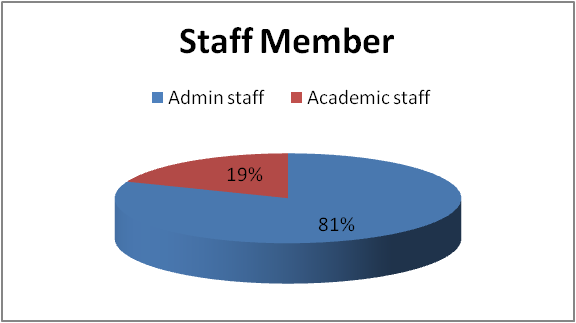
Q1. Are you an administrative staff or an academic staff?
Findings: 81% of attendees are administrative staff and 19% are
academic staff.
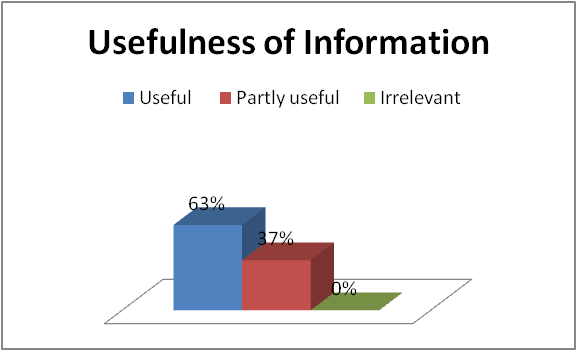
Q2. How useful is the information presented in the training session?
Findings: 63% of the attendees found that the information presented
in the class is useful and 37% of attendees found that only some
information
are useful.
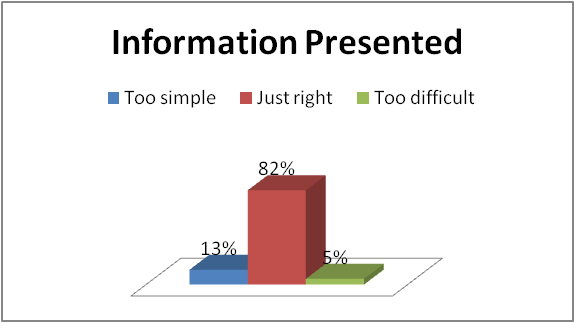
Q3. Is the information presented in the right level?
Findings: About 82% of the attendees found that the information
presented in the training is at the right level.
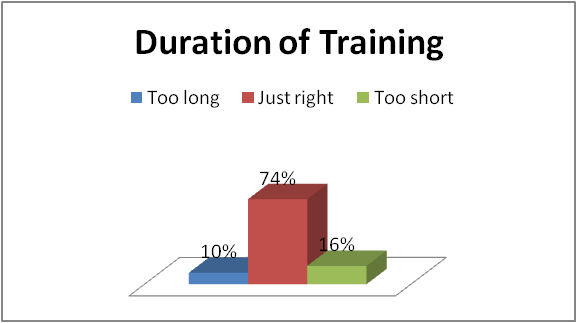
Q4. Please comment on the duration of the training.
Findings: 74% of the attendees found that the duration of the
training is just right.
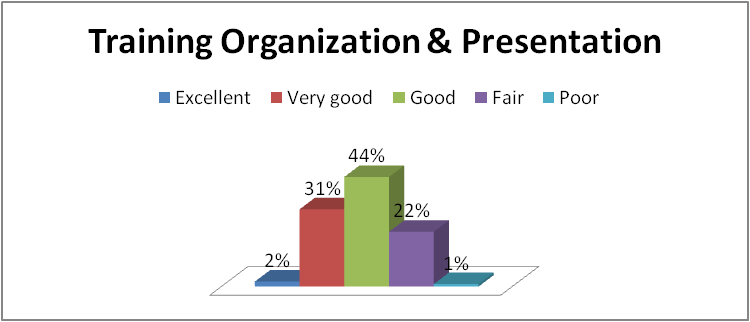
Q5. How well is the content of the training organized?
Findings: About 77% of the attendees rated the training organization
and presentation to good or above.
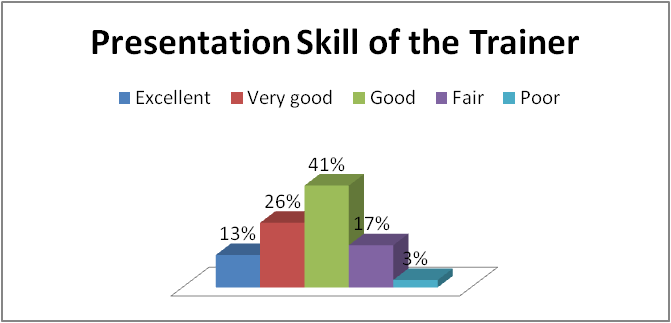
Q6. Please comment on the presentation skill of the trainer(s).
Findings: About 80% of the attendees rated the presentation skill
of the trainer to good or above.
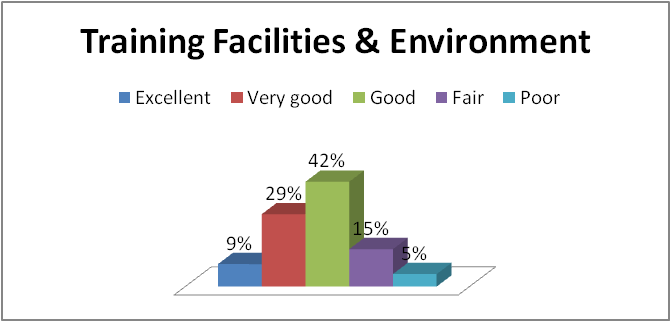
Q7. Please comment on the training facilities and environment.
Findings: About 80 % of the attendees rated the training facilities
and environment to good or above.
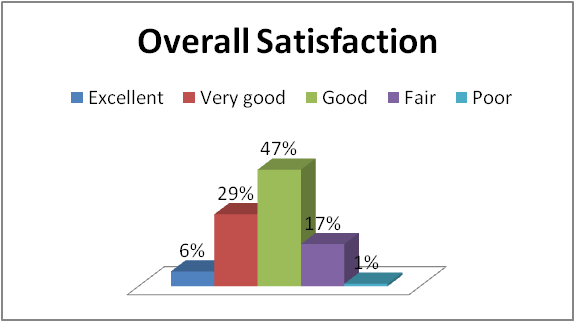
Q8. Please rate your overall satisfaction.
Findings: About 82% of the attendees rated the satisfaction level
of the courses to good or above.
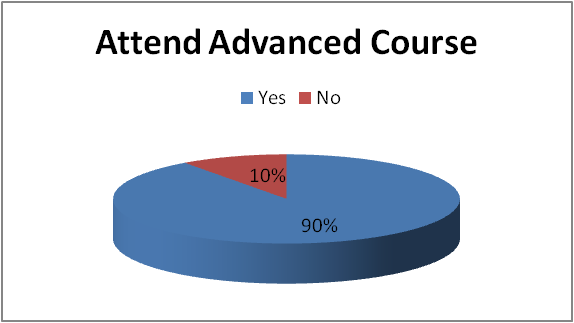
Q9. Would you like to attend a more advanced training of this
subject
in the future?
Findings: 90% of the attendees would like to attend more advanced
training courses in the similar subjects in the future.
Q10. How can we improve this training class?
Findings: In order to improve the training classes, some attendees*
suggest the following:
| Course |
Suggestions |
| MS Office 2007 New Features |
The computer is unstable in the lab, suddenly restart the pc a few times in the afternoon. |
| Using Acrobat 7.0 |
The version Acrobat 7 in institute could not create PDF file when we use it yesterday resulting in the tutor cannot demonstrate converting doc., xls, rtf.,etc in pdf in lesson.
If teaching content can be more intensive, it would be better.
And if the tutor can make a roundup to us before completing lesson, it would be better. |
| Using Acrobat 7.0 |
Please prepare the software needed before the course start. |
| Using Acrobat 7.0 |
make it longer time.
the content can be moe detailed, some aspects is missing, for instance, security locking in Acrobat and so on. |
| Using Acrobat 7.0 |
improve the stability of the software, and should teach in Acrobat 8 or above. |
| Introduction to Dreamweaver MX 2004 |
I think there are rooms for improvement in the presentation skill and organisation of the training on the trainer's side. |
| Introduction to Dreamweaver MX 2004 |
I think ITS should provide more quote for the course. Also they can show which course are not full after the registration,so our staff can take the remaining to fully utilize the resource. |
| Introduction to SPSS |
Please teach more specifically, and don't waste too much time on teaching "format" of table. |
| Introduction to SPSS |
It would be better if the instructor give a detail introduction on what he/she is going to talk about today (listing them in a slide).
It would be also better to refer more to the handbook before teaching us how to operate the software. |
| Introduction to SPSS |
It is a bit difficult to view the board and the teacher in this setting. |
| Introduction to SPSS |
Include one additional short break (e.g. 5 minutes) in each session.
The last session on SPSS was a bit too fast. |
| Advanced Dreamweaver MX 2004 |
It is suggested that the speed of the training class can be faster. |
| Advanced Dreamweaver MX 2004 |
(1)The trainer is unfriendly, unhelpful and lack of initiative in identifying and resolving our problems. (2) He gave excessive time for us to try the application. By accident, he let us known he was browsing the webpage of 'stock & share' during the class. (3) He told a few stories about his wife which did not benefit to our learning. (4) He repeated many contents of 'introduction' programme. He only elaborated a few skills related to the topics on the course book but those were not included in the book. Most of the contents in the books had not been covered in the class. |
| Introduction to Photoshop CS2 |
The instructor's computer shut down for about three four times, that made disturbances.
The instructor seems run out of patience if you ask more questions!!!
The basic content may be done within half day, whole day is quite too much for the basic content. |
| Introduction to Photoshop CS2 |
My desktop suddenly rebooted several times during training. |
| MS Excel 2007 Advanced |
the computers will shut down when we doing the pivot table. so that we canot learn this function. |
| MS Excel 2007 Advanced |
The computers suddenly down during the lesson. |
| MS Excel 2007 Advanced |
Half of the computers are broken down when using pivot table in excel |
| VBA for MS Excel |
The note should be much more informative |
| VBA for MS Excel |
I think this course is more like programming rather than VB. To improve, I think more VB content include in the course. |
| VBA for MS Excel |
Break into more sessions with less hours per session |
| VBA for MS Excel |
Apart from teaching the Visual Basic concepts / programmes, it would be very useful if the trainer can provide us some examples/ good practice on VB in Excel so that we can have stimulation on how others use VB in Excel in working environment. |
| Adobe Acrobat Connect Pro (in Cantonese) |
better presentation skills e.g. clearer demonstrations of steps, more accurate punctuations, clearer articulation |
| MS Excel 2007 Advanced |
the PC shutdown for a few times when the Pivot table is running, this case happens in many of our participants. |
| MS Excel 2007 Advanced |
Computer auto down 5 times when doing pivot table |
| MS Office 2007 New Features |
the course outline mentioned that it covers Outlook, but the instructor quoted that it does not. Which is different from my expectation.
For powerpoint, the course hasn't covered animation which is quite important for powerpoint user |
| MS Office 2007 New Features |
Should be better time management. There was less than half an hour for the part of powerpoint which most of our staff want to know more. |
| MS Office 2007 New Features |
Preferrable to have 1.5 days for the training as this composes of three software packages, MS Words, Excel and Powerpoint. One day's training seems to be too short. |
| MS Office 2007 New Features |
Poor time management of the tutor, he put too much time in teaching MS Word.
He spend too much time in answering questions from individuals.
Outlook was not taught in this lesson but according to ITS webpage, Outlook should be one of the topic. The tutor said they did not put Outlook in this training course. |
| MS Office 2007 New Features |
Advance features for MS Outlook would be useful for HKIEd staff |
| MS Office 2007 New Features |
(1) Too rush. The trainer did not have sufficient time to answer all questions.
(2) Office Outlook was not covered. |
Note: In order to improve the quality of the training courses
in the future, some of the comments and suggestions are sent to the
contractors
for reference.
Q11. What other information Technology related training courses
/ seminars
would you suggest ITS to offer in the future?
Findings: In addition to our existing training courses, some attendees*
suggest ITS to organize the following training courses / seminars in
the
future:
|
Courses Suggested by attendees |
| 1 |
Website design |
| 2 |
Web design |
| 3 |
training courses using Presenter and Flashpaper |
| 4 |
SPSS - not enough class for this. I have applied several times, but without one success.
Simple - Video editing and transformation
Design - for namecard, poster, some card or booklet. |
| 5 |
Powerpoint |
| 6 |
Please arrange more courses on Excel Advance & Words Advance. Unfortunately I cannot attend the course of Excel Advance on 13/3 because I will be on vacation leave that day. Thx. |
| 7 |
MS outlook |
| 8 |
MS Outlook |
| 9 |
MS ACCESS 2007 |
| 10 |
Latest and coming trend, technology in general and in education sectors environment |
| 11 |
Indesign, Nvivo, publisher etc. Thanks. |
| 12 |
I think ITS can provide more updated course. Since it is 2004, the updated one is CS4 which is quite different from it. |
| 13 |
how to digitalize multi-media materials for teaching etc. |
| 14 |
Excel advance |
| 15 |
Endnote |
| 16 |
Draw 3D grahic |
| 17 |
Can the training class arrange more frequently? 3 months is too long. Can some of the class be taken after office hour? Some of the class we may want to join but we may not attend them during office hour. |
| 18 |
Advanced VBA |
| 19 |
Adobe Illustrator / Adobe InDesign |
Note: Some suggested training courses are already on our offering
list, and some will be offered in the future.
|